Blog

  • Why Emotional Intelligence Matters More Than IQ

    Why Emotional Intelligence Matters More Than IQ

    Introduction

    So there was this guy at my old job, Daniyal, ridiculously smart. Like, could-do-calculus-in-his-head smart. He’d finish a report in the time it took me to find the right Excel tab.

    Meanwhile a guy from the sales team, average grades by his own admission, just… got it. Read the room every single time. Walked right past Daniyal into the manager’s chair.

    That bugged me for years, not gonna lie. Still does a little.Eventually I figured out why, or at least I think I did. Emotional intelligence matters more than IQ in most situations that actually decide how far you go and nobody really teaches you.

    Let’s get into what emotional intelligence actually is, why it tends to beat raw IQ, and what you can actually do about building more of it.

    What Is Emotional Intelligence, Exactly?

    Emotional intelligence EQ, emotional quotient, whatever you want to call.It is basically the skill of understanding emotions. Yours. Other people’s. Both.

    Wikipedia’s version is drier: the capacity to identify and regulate emotional information to guide thinking and behavior. Just not how a human being would explain it to a friend.

    Here’s how I’d put it instead: it’s not letting your feelings drive the car. But also not locking them in the trunk and pretending they’re not there.

    How Is Emotional Intelligence Different From IQ?
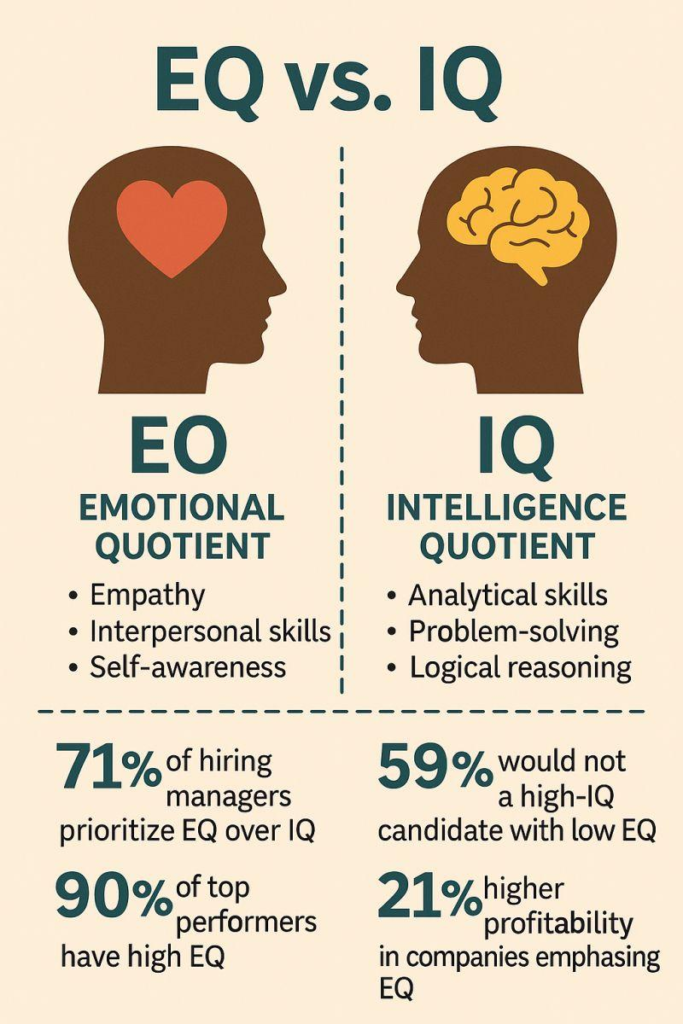
    IQ’s a different animal completely. Logic, memory, pattern recognition, that kind of processing speed stuff.

    Genuinely usefu, I’m not knocking it. But IQ tests were never built to predict how you’ll handle a tense meeting. A coworker who’s clearly having a rough week, or your own temper. When a project falls apart at 5pm on a Friday, again, for the third week running.

    IQEmotional Intelligence
    Measures logic and memoryMeasures self-awareness and empathy
    Mostly set early in lifeKeeps developing as you live
    Predicts test scoresPredicts how well you lead and connect
    Hard to shift muchActually responds to practice

    So when people throw around the phrase “emotional intelligence matters more than IQ,”. They’re not saying smarts are useless. They’re saying something a bit more specific than that.

    Being smart gets your foot in the door. What happens after that is a whole different skill set.

    Why Does EQ Actually Beat IQ in Real Life?
    Here’s the part that convinced me, honestly. Emotional intelligence apparently accounts for something like 58% of job performance across a huge range of roles. That’s not a rounding error.

    And about 90% of top performers, the actual standout employees, score high on emotional intelligence tests. Ninety percent,That’s a pretty loud signal if you ask me.

    Leadership is where it gets almost unfair. EQ is reportedly around four times more predictive of leadership success than IQ alone.

    There’s a money angle too, which I’ll admit got my attention faster than the psychology did. People with strong EQ tend to out-earn low-EQ peers by something like $29,000 a year. Mostly because they’re just better at conflict, negotiation, and building actual trust.

    MetricWhat Research Shows
    Job performance tied to EQ58%
    Top performers with high EQ90%
    EQ’s edge over IQ in leadership~4x
    Yearly earnings gap~$29,000

    None of this means IQ stopped mattering, to be clear. It just stops being the deciding factor pretty early on. After that, EQ takes over the driver’s seat.

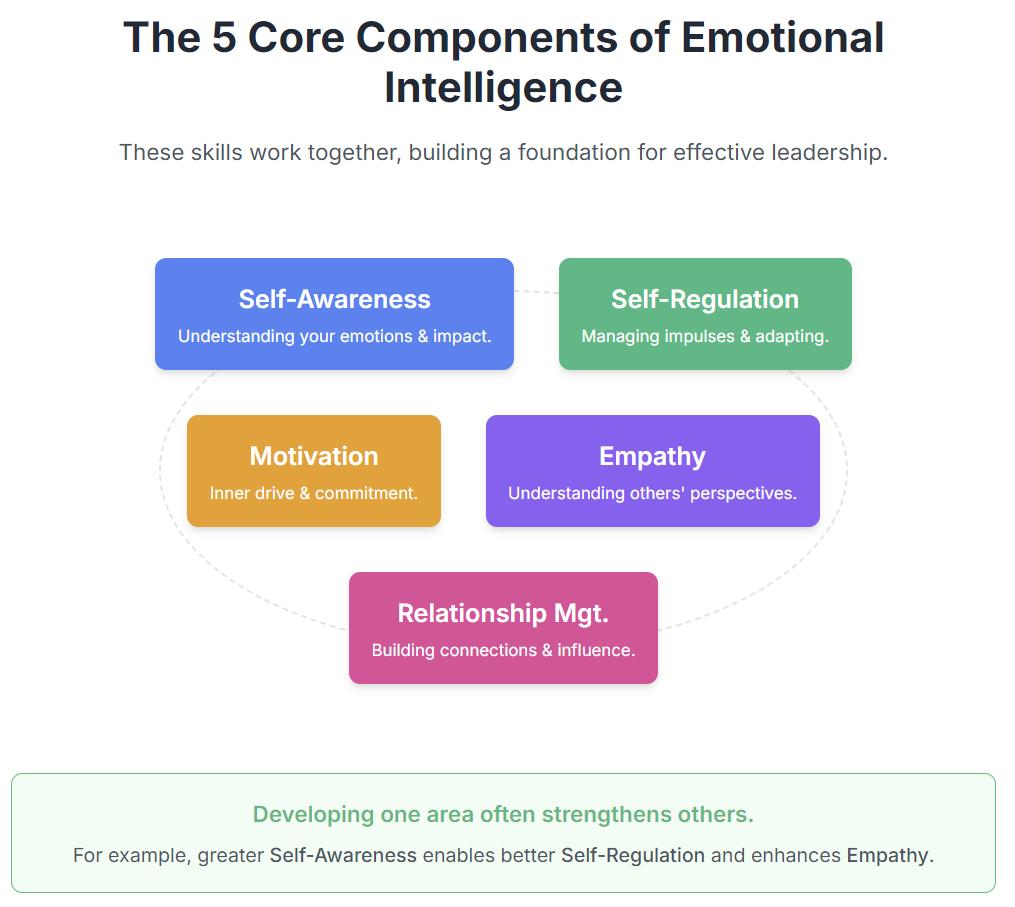
    The Five Pieces Goleman Talks About

    Goleman’s framework splits emotional intelligence into five parts, more or less. Worth knowing, since they quietly show up everywhere above.

    • Self-awareness is just noticing what you’re feeling while you’re feeling it, not three hours later in the shower.
    • Self-regulation is what you do with that feeling once you’ve noticed it — managing it instead of it managing you.
    • Motivation, in this context, means chasing goals for reasons that aren’t just money or a title.
    • Empathy is reading what someone else is actually feeling, accurately, instead of just assuming.
    • And social skills tie the whole thing together — handling conflict, building rapport, all of that.

    Okay, So How Do You Actually Build This?

    Emotional intelligence isn’t something you’re stuck with from birth, thankfully.

    Goleman’s whole argument was that it’s learnable. Not fixed, like your eye color or your height.

    1. Get specific about what you’re feeling. “I’m annoyed” is a start, sure, but “I’m annoyed because I feel unheard in meetings” tells you something you can actually act on.

    2. Just… pause. For a second. Sounds obvious, I know, everyone says this. But five real seconds before responding to something frustrating genuinely changes how the conversation goes.

    3. Ask instead of guessing. When a coworker seems off, ask them. You’ll be wrong about your guess more often than you’d want to admit.

    4. Let feedback sit before you defend yourself. Your gut reaction to criticism is almost always to explain yourself immediately. Don’t. Just listen for thirty seconds first.

    5. Mind your tone, not just your words. People forget what you said way faster than they forget how you made them feel. Especially mid-argument.

    A few small habits that helped me, at least

    HabitWhy It Helps
    Writing down one emotional trigger each nightBuilds self-awareness, slowly
    One real conversation a day, actually listeningStrengthens empathy
    Naming feelings specifically instead of “fine” or “bad”Improves regulation
    Asking “what did I miss?” after a disagreementBuilds social awareness

    What People Actually Say on Reddit and Quora

    I’ve read way too many threads on this, probably an unhealthy amount honestly. One pattern keeps showing up though.

    Almost nobody credits a book for their EQ growth. It’s usually a person a manager who stayed calm during chaos. A breakup that forced them to actually sit with feelings instead of numbing out.

    A surprising number of posters also admit being smart made them kind of arrogant in their twenties. It took an emotional gut-punch, not an academic one, to knock that out of them.

    Which, honestly, tracks with everything else here. EQ seems to grow through getting knocked around a bit, not through reading about it in theory.

    There’s a Mental Health Angle Too

    Worth mentioning people with stronger self-awareness tend to handle stress noticeably better. Not perfectly, Just better.

    Some training programs report real drops in burnout after a few months of consistent practice. Makes sense when you think about it. If you can name what you’re feeling, you stop getting ambushed by it constantly.

    A Few Myths Worth Killing

    • High EQ doesn’t mean you’re always calm or agreeable it means you recover faster
    • It’s not some vague, unmeasurable soft skill, there are actual validated tests for it
    • It’s not fixed at birth the way a lot of IQ seems to be
    • Being “nice” and being emotionally intelligent are genuinely not the same thing

    Case Studies

    L’Oréal – Emotional Intelligence Predicted Sales Success

    According to the EI Consortium’s research on The Business Case for Emotional Intelligence, when global cosmetics company L’Oréal hired sales representatives.Researchers found that employees selected for their emotional intelligence competencies consistently outperformed those chosen through traditional hiring methods.

    Leadership at Nearly 200 Global Companies

    Research published in Harvard Business Review examined leadership competencies across nearly 200 large global companies in achieving long-term leadership success.

    Key Questions Answered

    Does emotional intelligence really outweigh IQ?

    For real-world outcomes leadership, relationships, career growth yeah, quite often. IQ still matters for technical work, but past a certain baseline, EQ tends to take over as the bigger factor.

    Isn’t emotional intelligence just being nice?

    Not really. Nice is about being pleasant. EQ is about reading emotional situations accurately and responding well.

    Can low EQ actually improve, or is it kind of fixed?

    It improves. That’s honestly the good news here unlike IQ, which barely budges over a lifetime, EQ responds to practice and honest feedback.

    Does EQ matter more than IQ for every job out there?

    Not every single one very technical, isolated roles might lean harder on raw cognitive ability. But anything involving people or pressure, EQ usually wins out.

    Last Thought

    Emotional intelligence matters more than IQ, not because being smart is useless. It’s because most of life runs on relationships, not test scores. Daniyal’s brilliance never went anywhere, by the way. It just wasn’t the whole answer.

    The people who actually go the distance are usually the ones who got decent at sitting with discomfort and responding instead of just reacting.So, start with one thing today. Notice a feeling. Name it properly. See what happens.
  • Why People Fear Change and How to Embrace It

    Why People Fear Change and How to Embrace It


    Introduction

    Okay, quick question before we start. Remember the last time your routine got completely flipped a new job, a breakup, moving to a city you’d literally never set foot in before? Your stomach probably dropped a little right before it got exciting.

    Mine did. Last time I switched careers I told myself, for months, that I was “just weighing my options.” I wasn’t. I was scared and calling it strategy.That’s basically what fear of change feels like from the inside, if I’m being honest.

    It’s one of the most common emotional reactions people go through, and almost nobody gets out of it clean. Doesn’t matter if the change got forced on you or you picked it yourself the nervous system reacts first and asks questions later.

    That’s just how the wiring works, for pretty much everyone, whether they’ll admit it or not.

    What Is the Fear of Change?

    Fear of change metathesiophobia, if you want the ten-dollar clinical word is basically discomfort or anxiety around anything unfamiliar. Sometimes it’s loud. A knot in your stomach the night before a big decision.

    Sometimes it’s tiny, barely there, just a flicker when a coworker suggests doing something slightly different than usual. Here’s what most people don’t realize: a bit of hesitation isn’t a flaw. It’s your brain doing its job a little too well, honestly.


    When Fear of Change Turns Into Avoidance

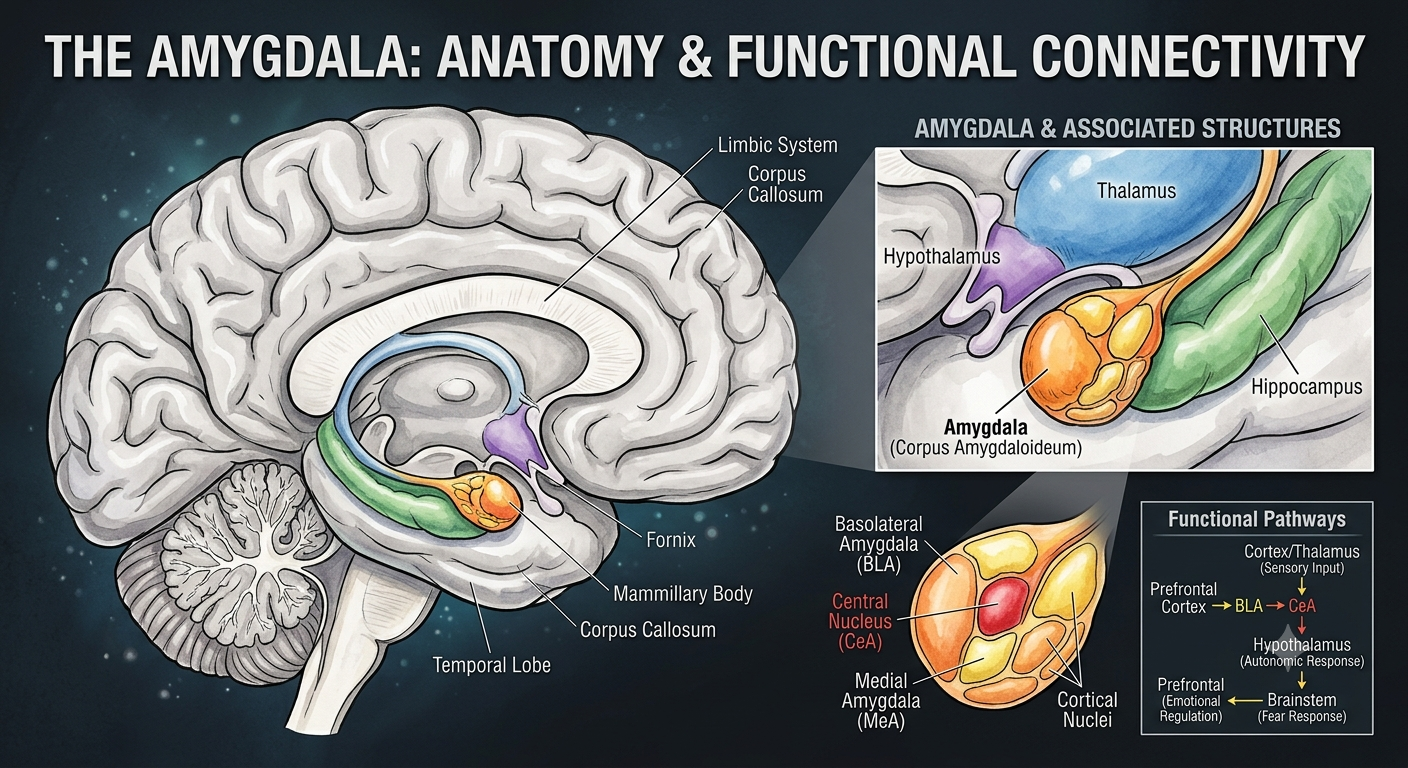
    Something new shows up, and the amygdala brain’s alarm system. Roughly speaking flags it as a potential threat before your rational mind even gets a vote.

    That’s the whole reason an exciting opportunity can still feel, physically, like a siren going off behind your ribs. Annoying, but that’s the mechanism.

    It becomes an actual problem once hesitation turns into avoidance. Once you start skipping real chances just to stay comfortable.

    There’s a genuine line between healthy caution the kind that helps you plan properly. And the kind of fear that just keeps you circling the same spot for years, going nowhere.

    Is Fear of Change Normal?

    More normal than people say out loud, if we’re being real. Almost everyone resists a little when their environment shifts, because the brain defaults toward familiar it’s cheaper, energy-wise, than processing something brand new.

    So if you’ve hesitated before a big decision? You’re not broken, You’re just a person with a brain. That said normal doesn’t mean you’re supposed to stay stuck there. Those are two different things, and people mix them up constantly.

    Why Do People Fear Change?

    It’s usually a mess of psychology, past experience, and plain biology, tangled together and most of us are carrying a bit of all three without ever clocking it.

    Fear of the Unknown

    Uncertainty is just uncomfortable. When you don’t know what’s coming, your brain fills the blanks in for you, And it almost always reaches for the worst version because that’s the version that keeps you alive if it turns out true.

    Add a loss of control on top, and the discomfort compounds fast. Behavioral economists actually have a term for part of this: loss aversion.

    Feeling a potential loss way more sharply than an equivalent gain feels good. Change gets mislabeled as loss constantly, even when it isn’t one.

    Fear of Failure

    Nobody likes mistakes. Especially the expensive kind money gone, time gone, a hard-won shot wasted. This fear is a big reason good ideas just sit in someone’s notes app for years, untested, going nowhere.

    Fear of Judgment

    A surprising number of people stay stuck not because the change scares them, exactly, but because they’re bracing for what everyone else is going to say about it. Family. Coworkers. That one relative who’s got an opinion on absolutely everything. Social media doesn’t help.

    Comfort Zones Feel Safe (Even When They Really Aren’t)

    Routine equals predictable, and predictable reads as safe to your brain, whether or not it’s actually good for you. A miserable-but-familiar routine can genuinely feel safer than an unfamiliar one. Weird trick, if you sit with it long enough.

    Past Negative Experiences

    If a previous change went badly failed business, a layoff nobody saw coming. A breakup that hurt more than you expected it to your brain files that away. Remembers it.

    Treats similar-looking situations as threats going forward, even years later. Even when the new thing barely resembles the old one. Fear of change tends to get stronger after one bad experience, not weaker.

    Worth sitting with, next time you catch yourself hesitating for a reason you can’t quite name.

    Signs You Are Afraid of Change

    Sometimes it’s obvious. Other times it hides behind words like “practical” or “just being careful” which, to be fair, is sometimes true. And sometimes just fear wearing a disguise. A few common tells:

    • Overthinking every decision, even the ones that genuinely don’t matter
    • Avoiding new opportunities without a real reason why
    • Procrastinating on things you actually want to do
    • Asking everyone around you for reassurance before you’ll act
    • Feeling anxious the second the future turns even slightly uncertain
    • Staying in situations that clearly aren’t working, purely because they’re familiar
    Fear-Driven BehaviorGrowth-Driven Behavior
    Waits for certainty before actingActs on partial information
    Asks everyone for approval firstTrusts their own judgment
    Avoids new opportunities entirelyTests small opportunities first
    Stays in bad situations out of habitLeaves once something stops working

    How Fear of Change Affects Your Life

    Left alone, this fear doesn’t just sit quietly somewhere in the background. It shapes real outcomes, slowly, over years the kind you usually only notice in hindsight.

    Career-wise, people pass on promotions they were genuinely qualified for. They stay in jobs that stopped fitting years ago, because the role at least feels known.

    Mentally, constant resistance to change wears you down in a way that’s hard to explain unless you’ve actually lived it. Shows up as stress. A slow erosion of confidence you don’t notice until it’s mostly gone.

    And on the personal-growth side, missed chances just pile up quietly. Regret, more often than failure, tends to be what people report feeling when they look back on it all years later.

    How to Embrace Change

    So how do you actually move past fear of change. Instead of just nodding along while reading an article about it? Start small. Genuinely small smaller than feels reasonable.

    None of this asks you to feel brave first. You act, and the confidence shows up a little after, not before. Which is annoying, honestly, but it’s kind of the whole trick.

    Take Small Steps Instead of Big Leaps

    Accept that change is inevitable fighting the inevitable just burns energy you could’ve spent adapting instead. You don’t need to overhaul your whole life this weekend, just pick one action and do it this week, that’s genuinely it.

    Focus on what you can control, because outcomes were never really yours to control anyway effort, attitude, and preparation are. When your brain jumps straight to the worst-case scenario, pause and ask whether that’s actually likely.

    Just fear narrating the same story it always tells. Treat failure as information instead of proof you shouldn’t have tried, then keep going anyway.

    Celebrate Small Wins

    Try to build something closer to a growth mindset people who see abilities as things they can develop tend to handle change noticeably better than people who treat them as fixed.

    And celebrate the small wins, actually celebrate them. Sent that application? Had the hard conversation you’d been putting off? That counts. Momentum builds confidence, and confidence is what slowly wears fear of change down, one small win at a time.

    Real-Life Examples of Embracing Change

    • Changing careers after a decade in something totally unrelated
    • Starting a business with zero guarantee it’ll work
    • Moving to another city for a real, honest fresh start
    • Learning a new skill later in life, just because it sounded fun
    • Recovering after failure and trying again, a little wiser

    Benefits of Embracing Change

    ChangeBenefit
    New SkillsPersonal Growth
    Career ChangeBetter Opportunities
    Healthy HabitsBetter Health
    New RelationshipsStronger Connections
    Taking RisksGreater Confidence

    Common Myths About Change

    MythReality
    Change always ends badlyMost changes end up neutral or genuinely positive
    Successful people aren’t afraidMost of them were afraid too — they just acted anyway
    It’s too late to changeGrowth doesn’t come with an expiration date
    Confidence comes before actionConfidence usually shows up after the action

    Key Takeaways

    • Fear of change is a natural, near-universal response, not a personal weakness.
    • The brain defaults to familiarity because it’s simply less energy-intensive.
    • Small, consistent action beats waiting around for confidence to show up first.
    • Growth almost always asks for a bit of discomfort somewhere along the way.
    • Confidence tends to follow action, not the other way around, no matter how much we wish it worked differently.
    • One bad experience can quietly amplify fear of change for years if it’s never examined.

    Real Case Studies

    IBM – Hardware se Services Shift (Early 2000s)

    IBM ko jab hardware business se services business ki taraf move karna pada, to employees mein bada resistance tha. Company ne transparent communication aur extensive training dekar employees ka fear kam kiya.

    Barclays – LIBOR Crisis ke baad Trust Rebuild

    Barclays changed its culture from performance-driven to customer-service-focused after the LIBOR scandal. Job losses and branch closures affected employee morale, but the transformation led to an 8% increase in the share price.

    Is fear of change a mental illness?

    Not usually. A mild version is just a normal response to uncertainty nothing wrong with you. It only crosses into clinical territory, sometimes labeled metathesiophobia, when it’s severe enough to actually get in the way of daily life.

    Can fear of change be overcome?

    Yes, though it’s rarely one big dramatic breakthrough like in the movies. It’s more like repeated exposure. Small steps, over and over, until the fear becomes… manageable. Not gone, necessarily. Just manageable.

    How long does it take to adapt to change?

    Depends on the person and the situation, honestly. Most people start settling in within a few weeks of consistent exposure to whatever the new normal turns out to be.

    What is the first step toward embracing change?

    Go smaller than feels necessary. Almost embarrassingly small. One low-risk action builds just enough confidence for the next one — that’s really the whole engine behind all of it.

    Conclusion

    Change is uncomfortable. It probably always will be, at least a little, no matter how many times you go through it. But avoiding it doesn’t make the discomfort disappear it just delays whatever growth was waiting on the other side.

    Every achievement you’ve ever admired in someone else started with them stepping into some kind of uncertainty anyway, usually without feeling fully ready for it.

    You don’t need to feel ready either. You just need one small step, even with fear of change sitting right there next to you the whole time, not going anywhere.

  • How to Do Keyword Research Like a Professional

    How to Do Keyword Research Like a Professional

    Introduction

    I’ve noticed something after years of writing and editing SEO content: the pages that flop almost never flop because the writing is bad. They flop because they answer a question nobody actually asked. Keyword research is the fix for that.

    In fact, it’s just listening, really. You find out what people are typing into Google before you write a word for them. However, this isn’t the old “find high volume, low competition” trick from a decade ago.

    AI Overviews eat clicks now, attention spans are shorter, and Google rewards different things than it did even two years back.That’s why, if you’ve been wondering how to do keyword research.

    What Keyword Research Really Means

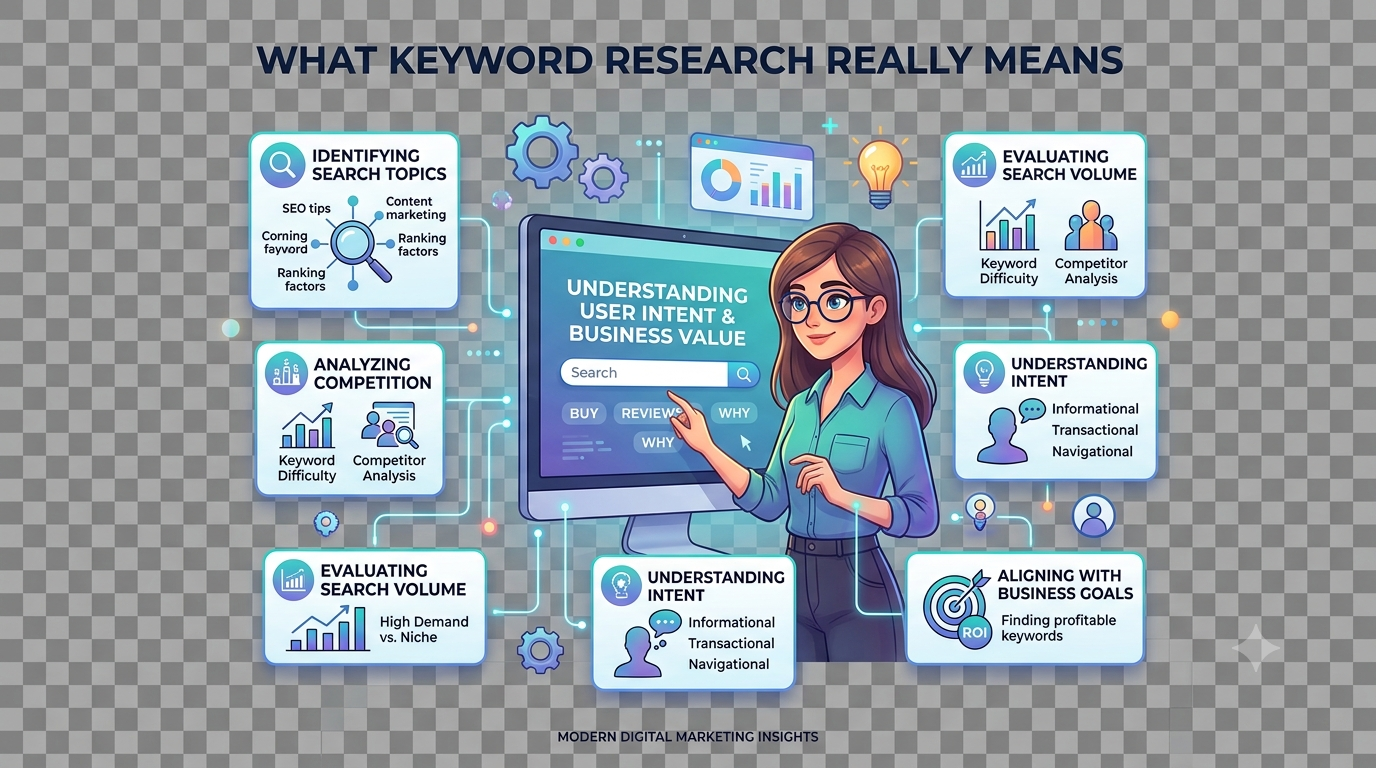
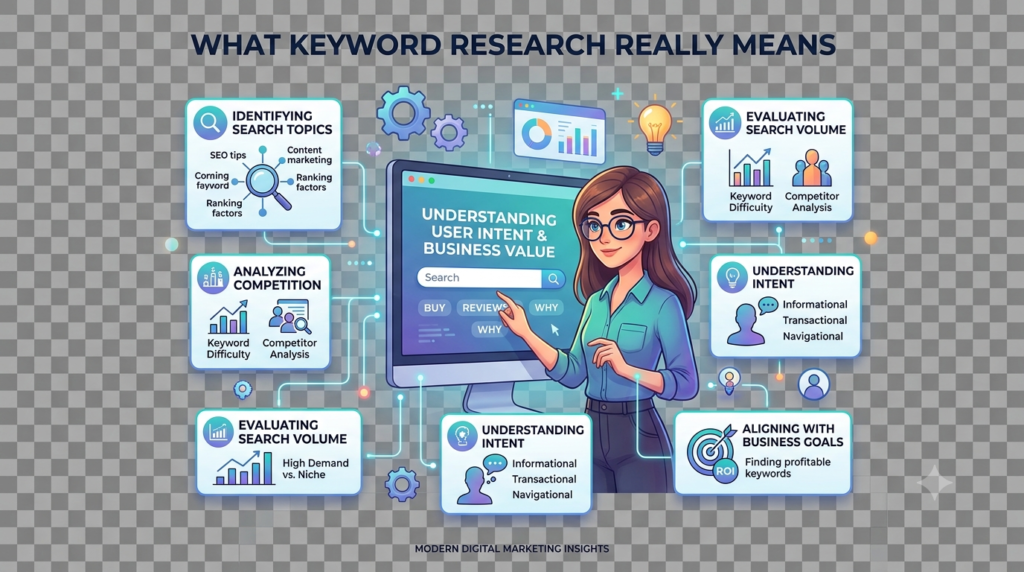
    Boiled down,Simply put, keyword research is figuring out. Keyword research is figuring out the exact words real people type or say into a search engine, then shaping your content around that. Sounds easy on paper.

    However, it’s no mostly because there are three separate questions bundled into one: what are people searching, why are they searching it, and can you realistically win that search.

    Learning how to do keyword research properly really just means getting comfortable answering all three, every single time.Here’s a number that surprises most beginners. About 95% of all keywords get ten or fewer searches a month, per Ahrefs’ data.

    Meanwhile a tiny sliver, roughly 0.16% of keywords, soaks up 60% of total search demand. Everyone’s fighting over that sliver. Instead, the real openings sit in the long, unglamorous tail nobody bothers checking.

    Does It Still Matter With AI Search Around?

    Fair question, honestly. After all, AI Overviews now reach now reach 1.5 billion people a month and cut click-through rates by something like 34%. Early 2026 data shows 68% of US Google searches ending with zero clicks, up from 60% two years earlier. So yes, the ground has shifted Even so, organic search still accounts.

    How AI Overviews Have Changed Search

    Organic search still accounts for roughly 53% of all website traffic, and Ahrefs looked at 863,000 SERPs. And found AI Overview citations still lean heavily on whatever’s already ranking in the top ten. Ranking the normal way is still, weirdly, your best shot at getting quoted by the AI too.

    Why Keyword Research Still Matters

    Long-tail search is where the real leverage sits nowIn addition, they convert about 2.5 times better than short, generic terms.

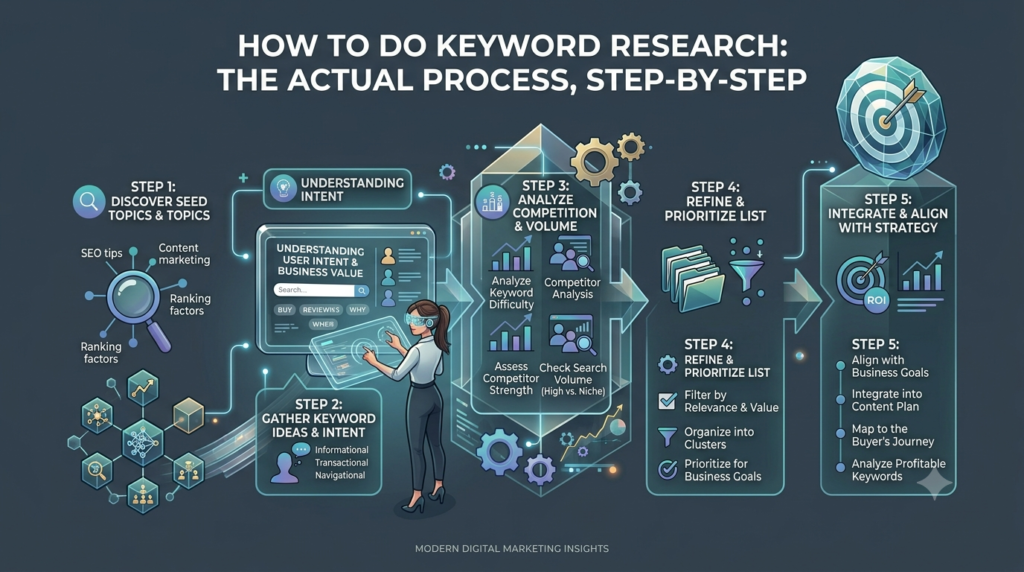
    How to Do Keyword Research: The Actual Process, Step by Step

    Here’s roughly how experienced SEOs go about it. It’s not a rigid formula, more of a habit you build over time.

    Step 1 — Seed Keywords First

    To begin with, pick three to five broad obvious terms tied to your business. Sell hiking boots? Your seeds might be “hiking boots,” “trail shoes,” “waterproof boots.” Don’t agonize over this partInstead, focus on coverage not precision. Precision comes later.

    Step 2 — Expand the List

    Drop those seeds into a keyword tool and you’ll get back hundreds of related phrases and questions. There’s also a manual trick Ahrefs recommends: Google your seed term, find a competitor ranking well, plug their domain into something like Site Explorer.

    You will see which keywords actually bring them traffic. Do this for two or three competitors and your list grows fast, without much guessing on your end.One thing worth knowing: don’t trust a single tool blindly.

    Difficulty scores swing a lot between platforms. Semrush often reads 10 to 15% higher than Ahrefs for the exact same keyword.

    Step 3 — Check Search Intent

    This is the step almost everyone skips, and it’s the one that matters most. If a keyword’s intent doesn’t line up with what your page can genuinely deliver, drop it. High search volume doesn’t rescue a mismatched keyword.

    Search intent usually breaks into four types.

    Intent TypeWhat the Searcher WantsExample Query
    InformationalAn answer or explanation“how does keyword research work”
    CommercialComparing options before buying“best keyword research tools”
    TransactionalReady to act, usually buy“buy Ahrefs subscription”
    NavigationalA specific website or page“Ahrefs login”

    Search your target keyword yourself before writing a single sentence. If the top results are mostly how-to guides, write a how-to guide.

    Google’s already telling you what format wins. Ahrefs saw this firsthand their own “backlink checker” page jumped 516% in traffic within six months, just from adding the free tool people expected to find there.

    Step 4 — Weigh Volume, Difficulty, and Value Together

    No single number tells the whole story here. A keyword with huge volume and brutal difficulty might be unwinnable for a small site. A keyword with tiny volume but strong buying intent can outperform ten “easy” keywords put together.

    Ahrefs frames it well: keyword research is a balancing act between traffic potential, difficulty, business value, and intent, not a hunt for whatever’s “easy.” Plenty of people chase easy-but-irrelevant keywords and end up with traffic that doesn’t pay the bills.

    Step 5 — Cluster, Don’t Chase

    Modern keyword work revolves around topics, not isolated terms. The sites pulling in the most organic traffic build out full topical coverage instead of picking off keywords one at a time.

    Group keywords that share intent under a single, well-built page rather than writing five thin posts for five variations of the same idea. One solid page will naturally rank for dozens of related terms on its own. Chasing keywords individually just wastes effort.

    Step 6 — Map and Prioritize

    Before building anything, decide what you’re actually optimizing for: rankings, traffic, or revenue. The answer changes your priority list. Rankings favor topical coverage and closing competitor gaps.

    Traffic favors high-volume terms even if commercial intent is weak. Revenue favors transactional, bottom-of-funnel keywords.Put it all in a plain spreadsheet: keyword, intent, volume, difficulty, priority, assigned page. That’s what actually turns research into something you can act on.

    Free vs. Paid Tools

    You don’t need a big budget to start. Google Search Console works best once your site already has content, since it shows real queries and real clicks straight from Google. Google Keyword Planner suits brand-new sites needing a baseline volume check.

    If you’re figuring out how to do keyword research on a tight budget. This is genuinely where I’d start before spending a rupee on anything else. Paid tools start earning their keep once you need competitor gap analysis or sharper difficulty scoring at scale.

    ToolBest ForFree OptionPaid, Starting At
    Google Keyword PlannerBaseline volume checksYes, free with Google Ads accountFree
    Google Search ConsoleSites with existing contentYes, unlimitedFree
    AhrefsCompetitor and backlink researchLimited keyword generator~$107/month
    SemrushAll-round SEO teamsLimited daily queries~$139.95/month
    Moz Keyword ExplorerTeams already using Moz3 searches/day~$49/month
    Mangools KWFinderBudget niche sites5 searches/day~$29.90/month
    UbersuggestBeginners, solopreneurs3 searches/day$12–$40/month

    Mistakes People Keep Making

    None of these are exotic. They’re the same handful of traps, over and over, and honestly. Half of learning how to do keyword research well is just avoiding them consistently.

    MistakeWhy It BackfiresFix
    Chasing volume over intentRanking #1 for a term that never converts is a hollow winFilter every keyword through intent first
    Trusting one toolVolume and difficulty numbers shift a lot between platformsCross-check at least two tools plus Search Console
    Skipping the actual SERPTool data pulls focus away from what’s really rankingCheck the top 10 manually before committing
    Trusting KD scores blindlyA “15” difficulty score isn’t a promise of a rankingLook at who’s ranking and how well they cover it
    One page per keywordWastes effort instead of building depthCluster related keywords into one strong page
    Publish and forgetSearch behavior shifts, old content decaysReview keyword performance every quarter
    Keyword stuffingSearch engines catch it easily nowWrite naturally, fit keywords where they belong

    A Few Habits Worth Copying

    Pull your own Search Console data before doing anything else. Odds are you already rank for keywords you don’t know about, sitting one small tweak away from page one.

    Read the actual SERP, not just the tool’s summary. It tells you the content type Google’s already rewarding for that query. Score keywords by business value, not raw volume. A 200-search term that converts beats a 5,000-search term that doesn’t.

    Use “People Also Ask” and autocomplete as free research tools. They hand you the exact follow-up questions your content should answer. Refresh old content on a schedule instead of abandoning it.

    A quarterly update often outperforms writing something brand new. Keep an eye on question-based queries specifically. Nearly 58% of them now trigger an AI Overview, so it helps to balance them with deeper comparison content that summaries handle less completely.

    Real Case Studies

    HubSpot Topic Clusters

    HubSpot’s early dominance in inbound marketing came from mapping whole topics instead of chasing keywords one by one. They built pillar pages, backed by internally linked cluster pages, addressing nearly every question a buyer might have.

    Ahrefs Fixing Intent, Not Just Words

    Ahrefs’ own “backlink checker” page was underperforming, despite being a core product page. Every competitor ranking above them was an actual free tool, not a description of one. So Ahrefs rebuilt the page around real free-tool functionality.

    DreamBox Breaking the Branded-Traffic Ceiling

    DreamBox, an online K-12 learning platform, leaned too hard on branded search. They expanded a math content subdirectory from 44 pages to 183, shifting toward non-branded, informational content.

    Traffic grew 733% in three months flat, and non-branded search became 92% of total organic traffic.

    FAQs

    What is keyword research in simple terms?

    What is keyword research in simple terms? Finding out what people actually type into search engines, then using that to guide what you write.

    How many keywords should one page target?

    No fixed number. Usually one primary keyword plus several closely related secondary and long-tail terms that share the same intent.

    Is keyword research still worth it with AI search around?

    Yes. AI Overview citations still lean heavily on pages already ranking in the top 10, so strong keyword targeting still counts.

    What’s the difference between keyword research and search intent?

    Keyword research finds the terms. Search intent tells you why people search them and what kind of content actually satisfies that search.

    Free or paid tools, which should I use?

    Start free with Search Console and Keyword Planner. Move to paid tools once you need deeper competitor analysis.

    Conclusion

    Keyword research isn’t the boring step before the real work starts. It is the real work, because it’s the only part where you’re actually listening instead of guessing. Start from seeds, filter hard by intent, weigh volume against difficulty and value, cluster instead of scattering, and don’t abandon what you’ve already built.

    Do that consistently and the traffic follows. Not because you outsmarted an algorithm, but because you understood the person on the other end of the search bar better than the next result did.

    Next time you sit down to write, skip the blank page. Open a keyword tool, search your topic, and read the top 10 results before typing a single sentence. That’s really the whole secret behind how to do keyword research like someone who’s been doing it for years.

  • On Page SEO Checklist for Beginners

    On Page SEO Checklist for Beginners

    Introduction

    I still remember the first blog post I ever published. I hit “publish,” felt very proud of myself, and then waited for the traffic to roll in. Not because the writing was bad. It is because search engines didn’t have any idea the page was about or why they should trust it.

    If you’re feeling like you’ve heard this before then you are not alone. Many people can create an excellent article, but they fail to take one crucial step using an On Page SEO Checklist for Beginners.

    An On Page SEO Checklist for Beginners will be a helpful guide through the optimization of all the essential aspects of website pages. Such as titles, headings, URLs, pictures, meta descriptions, and internal linking.

    What Is On-Page SEO (And Why Should You Care)?

    Picture two folders of documents. One is a mess no labels, random order, half the pages upside down. The other has clear tabs, a table of contents, everything where you’d expect it. Which one would you trust more if you needed to find something fast?

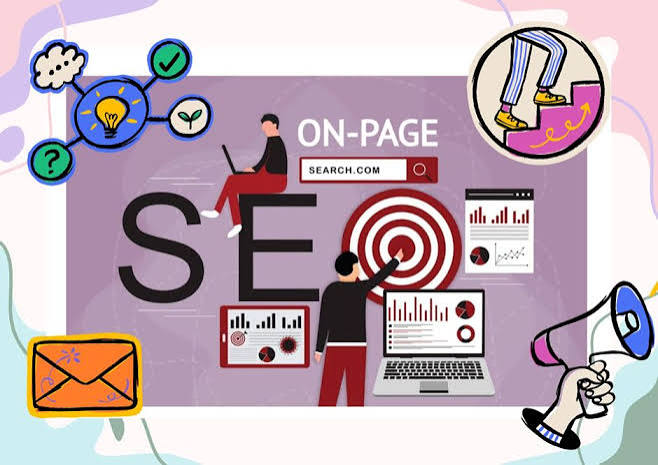
    That’s on-page SEO checklist in a nutshell. It’s how organized your page is, from a search engine’s point of view. Here’s the part beginners underestimate: great writing alone won’t save a poorly structured page.

    You could write something genuinely brilliant, but if the title tag is vague, the headings are chaos, and the page crawls along at eight seconds to load, it’s fighting an uphill battle.

    Google keeps saying it wants “helpful, people-first content” and that’s true. But helpful content still needs a skeleton search engines can actually read. The good part? Most of this is a one-time fix per page. Learn the checklist once, and it becomes muscle memory pretty quickly.

    Start With Keyword Research

    Don’t write a single word until you know what people are actually typing into Google. Skip this step, and you’re basically guessing and guessing is why a lot of pages never rank at all. Keyword research just means figuring out the exact words your audience uses when they’re looking for what you offer.

    Free tools like Google Keyword Planner or Google Trends work fine to start on-page-seo checklist. If you want to go deeper, Ahrefs and Semrush show you search volume, difficulty, and related terms people also search for.

    A few things worth knowing:

    • Stick to one primary keyword per page. Trying to rank for five different terms on the same page just confuses everyone, including Google.
    • Look at what related questions people ask around your topic, and weave those in where they fit.
    • Think about intent, not just the keyword itself. Someone typing “on-page SEO checklist” wants steps, not a history lecture on search engines.

    Once you’ve got your keyword, use it where it makes sense. Don’t cram it in everywhere search engines are shockingly good at spotting that now, and honestly, it just makes your writing worse anyway.

    Write SEO-Friendly Titles and Meta Descriptions

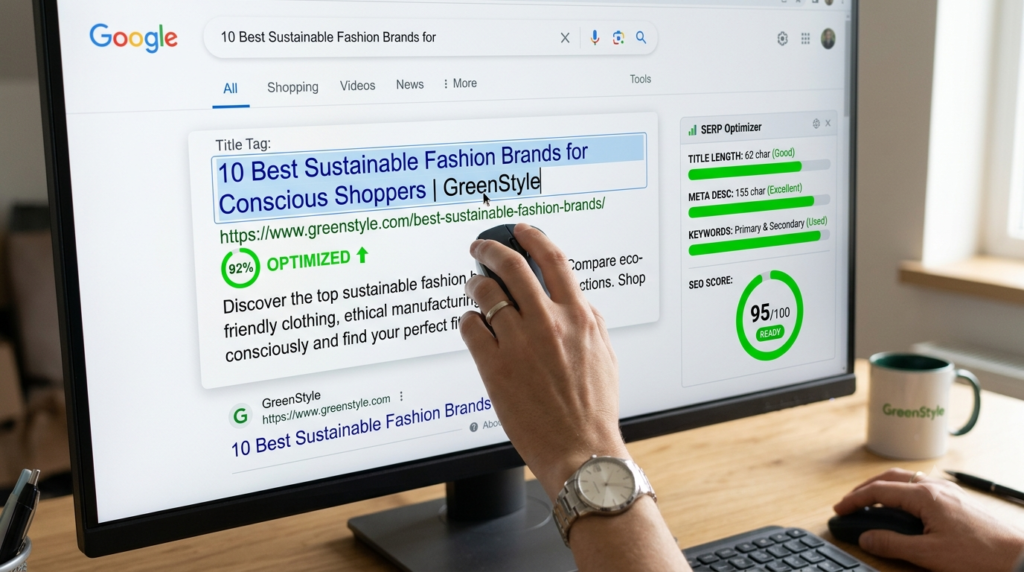
    Your title tag is usually the very first thing someone sees in search results, so it’s doing a lot of heavy lifting. Keep it specific, and try to get your main keyword near the front .Google tends to give more weight to words that show up earlier in a title.

    Length matters more than people think. Ahrefs looked at nearly a million pages and found titles over 60 characters get rewritten by Google noticeably more often. Etsy ran their own tests across millions of product pages and found something similar. Shorter titles that matched what people were actually searching for got more clicks.

    Meta descriptions won’t directly move your ranking, but they absolutely affect whether people click once they see your page in results. Treat it like a tiny ad. Keep it somewhere around 140–160 characters. Make it unique for every page (don’t reuse one across your whole site), and give people a reason to click.

    Quick example:

    • Weak: “SEO Tips”
    • Better: “On-Page SEO Checklist for Beginners: 15 Steps That Work”

    See the difference? One tells you nothing. The other tells you exactly what you’re getting.

    Clean Up Your URLs

    Nobody thinks about URLs until they’re a mess, and by then it’s usually too late to fix without breaking links. Keep it simple: descriptive words, hyphens between them (not underscores that’s still considered sloppy), and cut anything unnecessary. Skip dates too, if you can.

    A page called “flower-care-guide” ages a lot better than “flower-care-guide-2026,” which starts looking outdated the moment the year changes. One means nothing to anyone. The other tells you the whole story before you’ve even clicked.

    Get Your Heading Structure Right

    Headings work like signposts they help readers scan the page and skip straight to what they need. They give search engines a rough outline of what’s covered where.

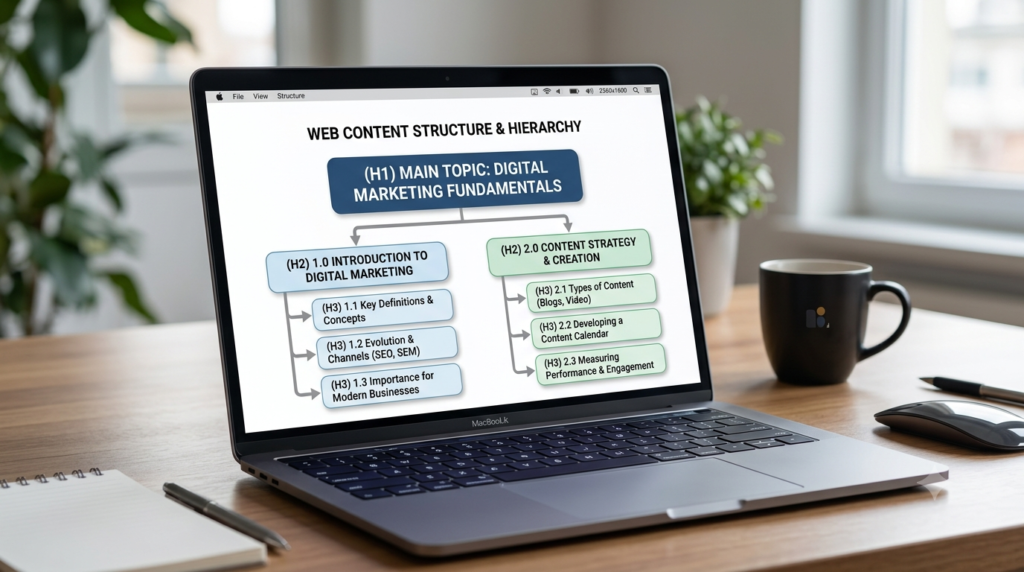
    Keep it simple: one H1 per page (your main headline), then H2s and H3s to break things into logical chunks. Each one should actually describe what’s underneath it “More Tips” tells nobody anything useful about on-page-seo checklist.

    Now, here’s something that might surprise you: headings aren’t the ranking superpower a lot of old SEO advice makes them out to be. Neil Patel ran controlled tests across multiple sites and found different heading structures made basically no measurable difference to rankings.

    Even Google’s own John Mueller has said publicly that a site can rank just fine with zero H1 tags, or five of them. So the real payoff of clean headings isn’t some algorithm trick. It’s that people actually stay on your page longer when they can find what they need, and that helps you indirectly.

    Optimize Your Images

    Images make a page more engaging, sure, but sloppy ones quietly work against you slowing your load time down and giving search engines nothing to go on.

    Here’s what actually matters:

    • Rename your files before uploading. “golden-retriever-puppy.jpg” beats “IMG_2931.jpg” every time.
    • Write alt text that actually describes what the image is showing, in context. This isn’t just a nice-to-have either Google can use that alt text as anchor text if the image is functioning as a link.
    • Compress everything before it goes live. Oversized images are one of the most common reasons a page loads slowly, full stop.
    • Where you can, use a format like WebP smaller file size, barely any visible quality loss.

    Master Internal and External Linking

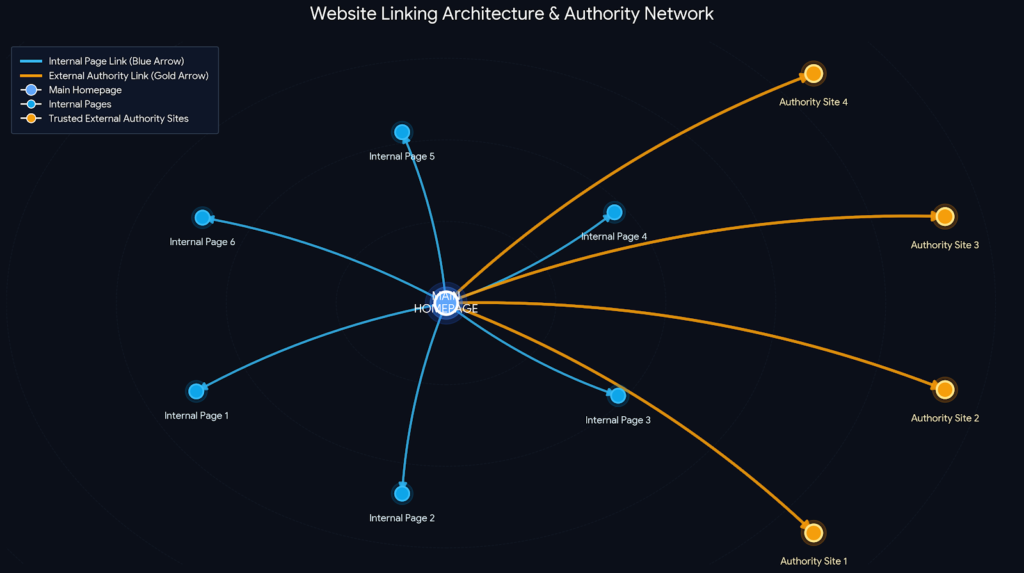
    Links do a lot more work than beginners give them credit for. Internal links links to your own other pages. It help search engines discover your content and help visitors find related stuff without hunting for it.

    They also spread ranking value from your strongest pages to newer ones that need a boost. Keep it natural: only link where it genuinely fits the sentence. Only link to pages that are actually relevant, and don’t hammer the same link five times in one article.

    As a rough guide, somewhere around 3 to 5 internal links per 1,000 words tends to work wellenough to be useful without turning your article into a maze. Don’t skip linking out either. I know it feels backwards to send people away from your own site, but linking to credible, authoritative sources actually builds trust.

    There’s a neat experiment an SEO consultant named Shai Aharony ran. A while back he built ten identical websites around a completely made-up term with zero existing search history. Gave five of them outbound links to authoritative sources like Oxford, and left the other five without.

    The sites with outbound links behaved noticeably differently. So no, external links aren’t some kind of ranking leak. That fear is mostly outdated.

    Don’t Ignore Mobile Friendliness and Page Speed

    Chances are, most of your visitors are on their phones right now, reading this on a bus or between meetings. Google evaluates your site with mobile-first indexing, which basically means the mobile version of your page is the one that counts most.

    Speed matters more than it sounds like it should. Deloitte and Google once ran a massive study 30.5 million user sessions and found that even a tiny 0.1 second improvement in load time. Produced measurable gains in how people behaved on the page. That’s it. A tenth of a second.

    What to actually do: compress your images, ditch bloated page builders and plugins. You don’t need, and run your pages through something like Google PageSpeed Insights every so often just to check.

    Write for Humans First (User Experience and Readability)

    Keep paragraphs short two to four sentences, honestly. Break up dense sections with bullet points or subheadings or the occasional image. Use plain language, and if you have to use a technical term, explain it the first time so nobody’s left scrambling to Google it mid-sentence.

    Here’s a question worth asking about every page before you hit publish: does this actually answer what my reader came here for? If yes, you’re most of the way there already everything else is just polish.

    Schema Basics for Beginners

    Schema markup sounds intimidating, but it’s really just a bit of extra code that spells out your content. More precisely for search engines like translating your page into a language machines read more literally.

    You don’t need to code it by hand. Plugins like Yoast SEO or Rank Math will generate basic schema for you automatically if you’re on WordPress. As a beginner, two types are worth knowing: FAQ schema, which can get your Q&As showing up directly in search results. Article schema, which flags things like author and publish date for search engines.

    Aim for Featured Snippets

    Featured snippets are those highlighted answer boxes that sometimes sit above the regular search results. Land one, and your visibility jumps even if you’re not technically the #1 ranked result. A few things that help your odds: answer the target question directly and early, near the top of the page.

    Use numbered lists or tables for anything step-by-step or comparison-based those formats are easy for Google to lift straight into a snippet. And structure FAQs cleanly, with the question as a heading and the answer sitting right underneath, no fluff in between.

    Common On-Page SEO Mistakes to Avoid

    Even well-meaning beginners fall into a few of the same traps, over and over:

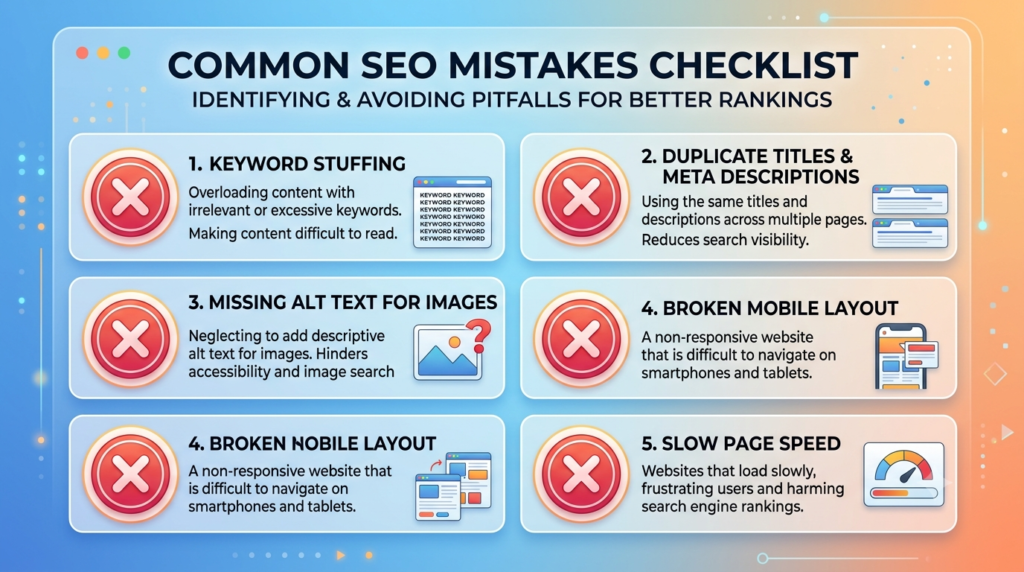
    • Keyword stuffing. It doesn’t help you rank. It just makes the writing worse and, honestly, a little painful to read.
    • Duplicate title tags. Reusing the same title across pages confuses Google about which one should actually rank.
    • Ignoring mobile. A page that’s gorgeous on desktop and broken on mobile is going to underperform, no matter how good the content is.
    • Skipping alt text. It takes thirty seconds and too many people still skip it.
    • Publish and forget. SEO isn’t a one-and-done task. Pages need the occasional refresh to stay accurate and competitive.

    Your Beginner On-Page SEO Checklist

    Bookmark this. Run through it every time you publish or update a page:

    • Picked one clear primary keyword based on real search intent
    • Written a specific title tag with the keyword near the front, under 60 characters
    • Written a unique meta description with a clear call to action
    • Cleaned up the URL slug — short, hyphenated, descriptive
    • Used one H1 and a logical H2/H3 structure underneath it
    • Given every image a descriptive file name and alt text
    • Added a few natural internal links to relevant pages
    • Linked out to at least one credible external source
    • Checked how the page actually looks and loads on mobile
    • Compressed images and tested page speed
    • Kept paragraphs short and the page easy to scan
    • Added FAQ or Article schema where it makes sense
    • Answered the core question clearly, near the top

    Real Life Examples

    Ahrefs Study – Shorter Title Tags

    Ahrefs analyzed nearly one million web pages and found that longer title tags are more likely to be rewritten by Google. Pages with concise and descriptive titles had a better chance of displaying the original title in search results, which can improve click-through rates.

    Google & Deloitte Page Speed Study

    Google partnered with Deloitte Digital to analyze 30.5 million user sessions. They found that improving page speed by just 0.1 second increased user engagement and conversions across multiple industries.

    FAQs

    What is on-page SEO in simple terms?

    It’s everything you optimize directly on your own pages titles, headings, content, images so search engines understand the page and visitors actually find what they need.

    How is on-page SEO different from off-page SEO?

    On-page is stuff you control directly on your site. Off-page is external mainly backlinks from other websites and it builds your site’s broader authority and reputation.

    Do I need to hire someone to do on-page SEO?

    Not really. Most of it clear titles, sensible headings, optimized images is something a beginner can pick up and apply with a checklist like this one. No agency required.

    How long before I see results?

    It varies a lot, honestly. Some pages show movement in a few weeks, others take a couple of months, depending on competition and how consistently you apply this stuff.

    Is keyword stuffing still a problem in 2026?

    Yes, still. Search engines catch it easily now, and it makes for a worse reading experience on top of that so it’s a lose-lose.

    Conclusion

    On-page SEO sounds like a lot when you’re just getting started.It really boils down to a handful of habits repeated consistently: know what your audience is actually searching for. Structure your content so it’s easy to follow, and make sure every technical detail down to the alt text on your images is quietly working in your content’s favor.

    You don’t need to fix everything today. Pick one page, run it through the checklist above, and see what’s missing. Then do the next one. Small, consistent fixes like this add up faster than most beginners expect.

  • Excessive Smartphone Use and Its Harms

    Excessive Smartphone Use and Its Harms

    Introduction

    Smartphones play a crucial role in people’s lives. The problem of excessive smartphone use and its negative effects is gaining significance. These devices have significant advantages with regard to communication, productivity and information.

    But overindulgence can have a detrimental impact on both physical and mental health. Although these devices offer great benefits in communication, productivity and access to information. Too much screen time can have serious implications for physical and mental health.

    Studies are ongoing that associate excessive smartphone usage with other negative effects. For instance sleep disturbances, poor focus, heightened stress and strain on the eyes, and strained social interactions.

    The first step towards healthier digital habits and a balanced lifestyle is to understand the risks of excessive smartphone use. This article will delve into the main risks associated with excessive smartphone usage.

    Signs of Excessive Smartphone Addiction

    The thing is, there isn’t any arbitrary number of hours to determine whether it is “normal” or “excessive.” Working remotely and using a phone all day for client calls doesn’t mean someone is addicted to their phone.

    A person who only checks his cell phone for two hours. But can’t stay at a meal without checking his cell phone may be. Learning about the dangers of excessive smartphone use and the harms. It can enable you to identify unhealthy habits that are going on during use before they impact your daily life.

    The important thing is felt as a compulsion, not a choice. There are a couple of indicators to look out for:

    • You pick up your cell phone first thing every morning before you are fully awake.
    • You experience a slight worry when the battery level gets below 20%.
    • You begin an application which you feel you need to use for a minute and you end up using for hours.
    • You’re always losing your sleep because of late night scrolling.

    If you can relate to a couple of these. You may be experiencing some form of “problematic smartphone use,” aka “phone addiction.”

    What Is Excessive Smartphone Use?

    Well, it’s a good suggestion to make it from facts rather than emotions. A look at the recent industry and survey based research (2025-2026) yields a fairly consistent picture:

    • The worldwide average is now 3.5-5 hours a day of screen exposure. Some countries in Asia and North America having higher rates.
    • Almost 90% report checking their cell phone within 10 minutes of waking up – sometimes even before their coffee arrives.
    • As a matter of fact, almost half of the international population use smartphones.They say that they use their phone more than they want to. According to their own words.
    • About 20% battery life causes such a sense of anxiety or panic. Researchers have recently created a new term: “nomophobia” (no-mobile-phone phobia).
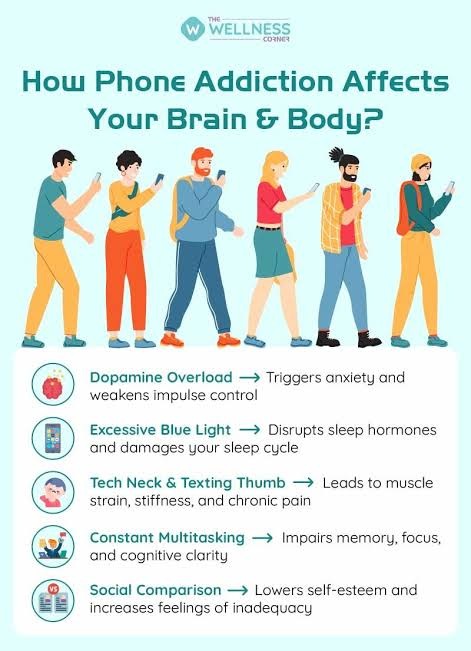
    • The heavier users report more eye strain, neck and posture pain (also called “tech neck”).Sleep issues and self-reported anxiety compared to lighter users.

    These are just suggestions from different research firms, so they are not “the truth. The trend, however, is clear-cut—screen time is only increasing from year to year. More people are recognizing their phone relationship isn’t healthy.

    Understanding Excessive Smartphone Use and Its Harms is the first step toward building healthier digital habits.

    The Real Dangers of Excessive Smartphone Use

    The effects on your body when you use it.The impact it will have on your body when you use it.

    It’s a slight understatement – the damage builds up over time. Ever had a sore bottom of the neck after spending too much time on the phone? Ever experienced a sore bottom of the neck after too much phone time? It’s not in their heads.

    The strain on your neck is increased when you look down at your phone. The further your head is down the more the strain is. This condition is now referred to as “tech neck” by a lot of doctors.

    It may also result in a chronic neck pain and permanent posture issues.Then the eyes.Then the eyes. You start looking at a bright screen for hours, and you wind up with dryness, blurriness and headaches.

    It wasn’t even a topic of conversation twenty years ago. Digital eye strain is one of the most common vision complaints physicians are seeing. Sleep this one is big. Blue light from screens can interfere with your sleep by affecting the sleep hormone melatonin.

    Many teens will admit that they are constantly sle eping through the night due to their cell phones.In all honesty, most adults will admit the same truth if asked to do so.

    The Impact on Mental Well-Being

    This is likely the most talked about aspect of this right now and it’s for good reason. Your brain never turns off and is always on the look out for the next pop up. That will have lasting effects of chronic stress.

    The catch is that the very apps that are meant to “connect” people. They used to excuse their heightened loneliness. Going through everyone else’s highlight reel, what they’ve accomplished. How pretty they are, the pictures they’ve taken, subtly drives in comparison and, for many, a sense of failure.

    Changes in Family and Social Connections

    One would expect a device for communicating to be used for bringing people together. In most instances it does the exact opposite. Excessive Smartphone Use and Its Harms can weaken relationships by reducing face-to-face communication and emotional connection.

    There’s a new term for this this and it’s strange “phubbing,” which translates to “phone snubbing.” It has become commonplace to the point that many couples and families have noted.They experience some real conflict about it. Particularly around the dinner table and during family time.

    One thing people fail to do is to have a genuine conversation. Due to the need for quick response and sending text messages. You can text someone, chat with them all day long and leave them feeling like they barely connected to you.

    Effects on Productivity, Learning, and Career Growth

    This has an impact on your work and studies.Here are its effects on your work and studies. It’s undeniable that phones are a major distraction in the classroom, in the office, and they are taking over.

    In fact, it’s supported by academic studies. Students that check their phones regularly throughout study time learn less and perform worse on exams. As compared to students who don’t check their phones throughout study time.

    It’s just the same at work. In fact, a high percentage of workers report that alerts break up their work several times a day. It may not seem that much of an inconvenience one at a time. But it can be a lot of an inconvenience over the course of a day.

    Everyday Risks You Might Overlook

    This is not a mental health issue, but rather a real physical life threatening one. Even though we have introduced technology to warn drivers when they are taking phone calls while driving. This is still one of the leading causes of traffic accidents.

    As there are only a few seconds to go wrong. Looking at a screen while walking also increases the danger. For example falling, crashing or being out of the way and suddenly entering traffic.

    Practical Ways to Manage Excessive Smartphone Use

    The good thing is that none of these is “permanent”. Habits can be changed over the course of years. But if you’re willing to make the effort, it can be done.

    Be aware of how many hours you are on your screen. This is being monitored by most mobiles already. The first thing to do is to see the true number, before changing anything. It will surprise you and come back to you.

    Reducing Excessive Smartphone Use and Its Harms starts with setting screen-time limits and taking regular breaks from your device.

    Reduce notifications that aren’t necessary. Fewer interruptions means you don’t need to pick up the phone that much.

    Make sure that spaces are free of telephones. The dinner table and the bedroom are good places to start.

    Try using the grayscale function. On the surface, the issue might appear minor. However, when it comes to color removal, apps will feel obvious lacking in their capability to continue scrolling.

    Have designated periods to see messages and social media rather than every minute, day, or hour.

    Keep your phone out of the bedroom, where it is already at night. This is the one habit that will help to curb late night scrolling more than anything else.

    Real life example

    A Real Case of Smartphone Addiction

    A clinical case published in the National Center for Biotechnology Information (NCBI) described an 18-year-old woman whose smartphone use reached nearly 8 hours every day.

    She constantly checked social media, felt anxious when separated from her phone, neglected daily responsibilities, and struggled to control her screen time despite knowing it was harming her life.

    Smartphone Overuse and Mental Health

    A 2023 case study published in Acta Neuropsychologica examined a 32-year-old woman who spent approximately 9 hours per day on her smartphone using social media, messaging apps, YouTube, and web browsing.

    Over time, she experienced reduced productivity, difficulty concentrating, disrupted daily routines, and symptoms associated with problematic smartphone use.

    Conclusion

    It’s not a “smartphone vs. smartphone” battle. They’re very handy, not possible and it’s not even necessary that they pretend. Yes, it’s the device, but more it’s the incremental behavior that occurs around it. Compulsive checking, late night scrolling, notifications that don’t help the brain to relax.

    Knowing about Excessive Smartphone Use and Its Harms can help you make better choices. It may promote health, relationships and overall quality of life. The initial step is simply seeing it. If you can accept you are doing it, then you are on the right track to changing it.

    Q1. What’s too much when you’re using a smart phone?

    There is no fixed time frame for this rule. Most scientists probably would not care as much about how many hours someone spends doing a task.

    Q2. So, how much time is healthy to be on a phone?

    This is about 2 hours per day, but can differ depending on your career, age and living style.

    Q3. Has excessive cell phone use become a problem that can cause anxiety or depression?

    Research has revealed that smartphone and social media overuse are linked to greater self-reported anxiety and depressive symptoms.

    Q4. So, what is ‘nomophobia ‘?

    The nervousness or worry that you may not have your phone. If the battery is flat or if you don’t have service, or simply if you left it at home.